Quick Summary: This guide provides a copyable IT help desk escalation matrix for UK teams with South African first-line support, emphasizing clear ownership, separate severity and priority scoring, and security routing. It includes a severity-versus-priority table, a blank matrix template, and a worked fictional ticket to show how escalations should flow. The key takeaway is to define first-line scope tightly, name owners and deputies for each tier, and test the matrix with drills to avoid stalled tickets.
A first-line colleague in South Africa sees that several UK users cannot reach a customer platform. The urgent question is not whether the ticket matters. It is who may investigate, who can approve access changes, who hears about a possible security event, and who owns the next update. Without clear answers, remote staff guess, tickets stall, and small problems grow. This guide gives you an IT help desk escalation matrix template you can copy, a severity-versus-priority table, security routing rules, and a worked fictional ticket. It suits an IT support severity matrix and a plain-English help desk escalation procedure for UK teams with South African first-line staff. For hiring context, see our South African IT support page. Teams supporting software products can also use our SaaS and technology staffing overview.
Step 1: Define First-Line Scope and Ownership
Before any IT help desk escalation matrix template works, you need one decision: what does first-line actually own? Everything else in this guide builds on that answer.
Set the First-Line Boundary
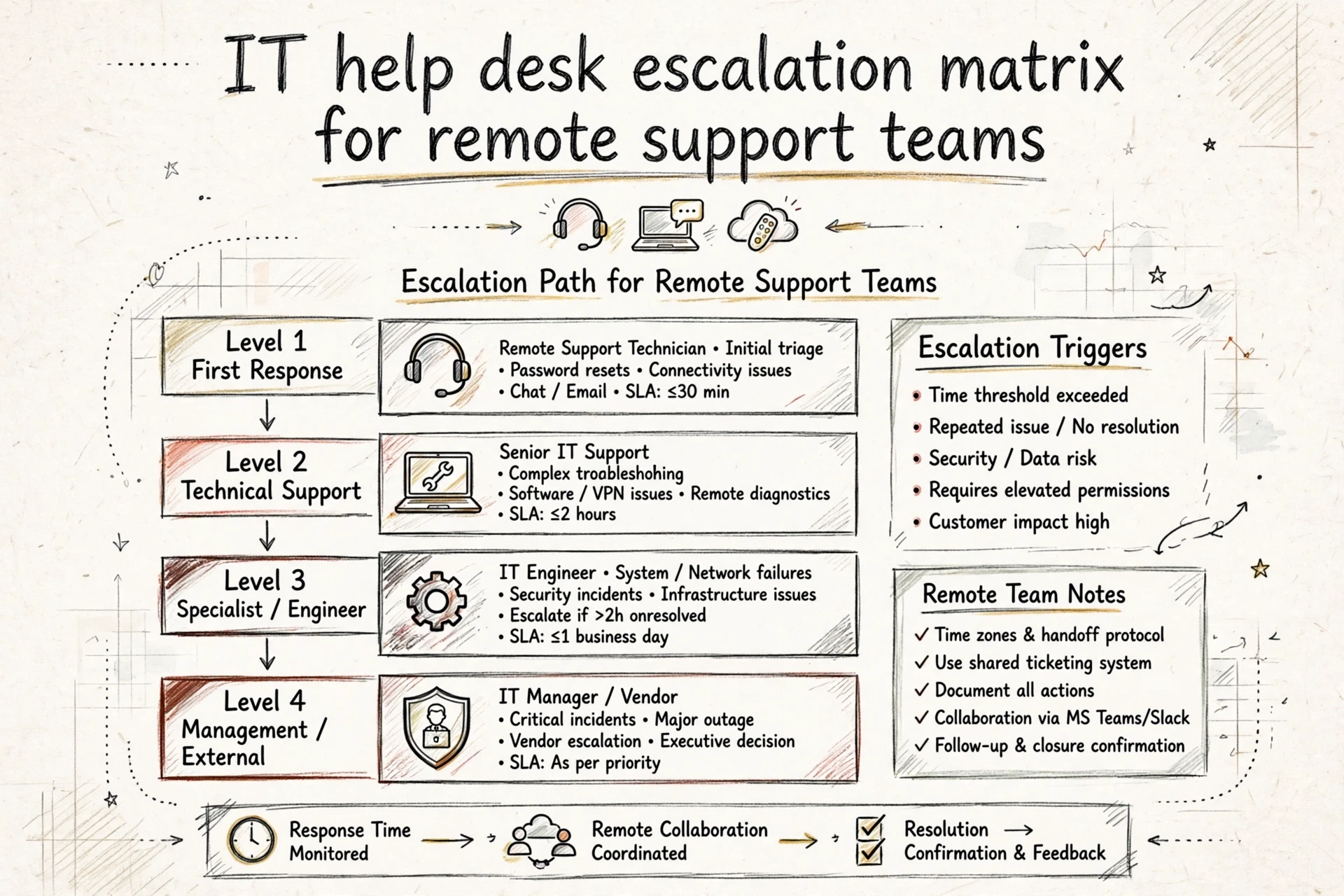
For this template, first-line support is the intake point for agreed tickets. Its responsibility is to record the issue, apply approved checks and resolve or route it within its authority.
Keep their scope narrow and clear:
- Password resets, account unlocks and access requests
- Laptop, email, VPN and software faults
- Printer, VoIP and network basics
- Simple “how do I” questions
Anything needing admin rights, server changes or database work goes to second-line. Write this list down. Unclear boundaries can leave a ticket waiting for a decision.
Assign Accountability, Authority and Deputies
Keep a named coordinator responsible for progress and communication, alongside the technical resolver. A handover is complete only when the receiving owner accepts it or the documented fallback is invoked.
Name three things in writing:
- Owner: who keeps the ticket moving at each tier
- Authority: what decisions each owner can make alone (for example, approving a licence spend)
- Deputy: who takes over when the owner is offline, with coverage hours written explicitly in UK and South African time
No named deputy, no resilient escalation.

Also Read: Remote Team Management Guide
Step 2: Classify Severity and Priority Separately
Most confusion in an IT help desk escalation matrix template starts here. Teams treat “severe” and “urgent” as the same thing. They are not.
For this template, severity describes the extent of the incident and priority determines handling order using impact, urgency and risk. Your definitions may differ by service. Atlassian documents how impact and urgency can be combined into priority; configure the mapping to your own services.
Use Impact, Urgency and Risk Together
Score three questions when any ticket arrives:
- Impact: how many users or systems are affected?
- Urgency: does work stop now, or can it wait?
- Risk: is data, money or compliance exposed?
A failure affecting one payroll operator can still have broad business impact at a payment deadline. Count the affected service and consequences, not only the number of users. Record coverage hours and an escalation route for issues arriving near the end of a shift.

Severity Versus Priority Decision Table
This is an illustrative mapping, not an industry service-level promise. Your service owner must approve targets and exceptions.
| Severity / impact | Urgency and risk | Example | Priority | Route |
|---|---|---|---|---|
| S1: critical service unavailable | Immediate, no viable workaround | Organisation-wide outage | P1 | Incident lead immediately |
| S2: team or important function blocked | Deadline imminent | Shared drive blocks a deadline-critical team | P1 | Resolver and incident coordinator |
| S2: significant degradation | Agreed safe workaround | Department can continue limited work | P2 | Named second-line owner |
| S3: limited disruption | Work can continue safely | Single-user fault with workaround | P3 | First-line procedure and timed escalation |
| Request rather than incident | Routine fulfilment | New approved accessory | P4 | Service-request workflow |
Suspected security incidents follow the separate security reporting route regardless of the ordinary queue priority.
Step 3: Build the Copyable Escalation Matrix
A useful matrix names the first owner, technical resolver, decision authority, deputy, acknowledgement target and coverage hours. Technical escalation supplies expertise; management escalation obtains authority or resources.
Completed Fictional Escalation Matrix
This example shows how a UK firm with a Johannesburg-based support analyst might fill it in. Response targets are illustrative only, not promises.
| Trigger | Coordinator | Resolver / authority | Deputy | Acknowledgement target | Coverage / next update |
|---|---|---|---|---|---|
| P1 service outage | Thabo, SA first-line | Priya, UK incident lead | Alex, UK deputy | 15 minutes | Agreed support hours; update every 30 minutes |
| P2 degradation | Thabo | UK second-line owner | Named second-line deputy | 1 hour | Agreed support hours; owner sets next update |
| P3 fault | First-line analyst | Approved procedure; escalate if unresolved | Shift lead | 4 support hours | Next update recorded on ticket |
| Security suspicion | First-line analyst | Named security lead | Security deputy | Immediately report | Use documented security coverage route |
All names and timings are fictional examples. The system will not escalate automatically unless that workflow is actually configured and tested.
Blank Escalation Matrix Tool
Copy the structure and fill every required owner and fallback. A response target is an acknowledgement target here, not a guaranteed resolution time.
| Trigger / priority | Coordinator | Resolver / authority | Deputy | Acknowledgement target | Coverage | If no acknowledgement | Next update |
|---|---|---|---|---|---|---|---|
| [ ] | [ ] | [ ] | [ ] | [ ] | [ ] | [ ] | [ ] |
| [ ] | [ ] | [ ] | [ ] | [ ] | [ ] | [ ] | [ ] |
| [ ] | [ ] | [ ] | [ ] | [ ] | [ ] | [ ] | [ ] |
Test it before you need it, which we cover in Step 6.
Also Read: Hire South African It Support Uk
Step 4: Add Access Boundaries and Security Routing
Most escalation matrices cover who fixes what. Fewer cover who is allowed to fix what. With remote South African staff, write both down.
Route Access Requests by Authority
Split access requests from fault reports. A password reset still requires the approved identity-verification procedure. Admin rights, database access, or changes to payroll systems are not. Give your first line a simple rule: if a ticket needs new permissions, it escalates to the UK-based manager who owns that system. They approve or refuse.
Grant only the permissions needed for the authorised task. Where temporary elevated access is appropriate, record the approver, scope, expiry and activity log. First-line staff must not approve their own access.

Escalate Security Indicators Immediately
Route suspected phishing, account compromise, ransomware or unauthorised disclosure promptly to the named security owner. Define the out-of-hours fallback and who may take containment actions. Follow the organisation’s incident procedure rather than improvising.
Add these to your matrix as its own row set:
- Suspected phishing: report promptly using the agreed security channel; do not interact further with suspicious content.
- Compromised credentials: report promptly; perform account containment only if authorised by the incident procedure.
- Customer data exposure: escalate to the UK data protection lead; legal review may follow.
Never let first-line staff investigate a live security incident alone. Their immediate job is to report, preserve relevant information and follow authorised instructions.
Step 5: Work Through a Fictional Ticket and Escalation
Completed Fictional Ticket Record
| Field | Entry |
|---|---|
| Ticket | Fictional #4821, 09:40 UK / 11:40 SA on a winter GMT date |
| Issue | Users cannot open shared drive |
| Severity | 2 – team blocked, one team affected |
| Priority | P1 – eight staff blocked on a deadline-critical service with no workaround |
| First-line action | Restart check done, no fix. Owner: Thabo (SA first-line) |
| Escalation | 09:52 UK, level 2, Priya (UK IT lead) |
| Outcome | 10:30 UK: certificate expired. Priya renewed access. Resolver note filed |
When the Route Changes
Link related tickets to a parent incident while retaining each affected user’s record and communication needs. If the fault looks like a breach, stop diagnosing and follow the security route instead. Log any change in the ticket so the next person sees why the path moved.
Step 6: Test the Matrix and Review Failed Handovers
A matrix you have never tested will fail at 2am. Run short drills before you rely on it.
Run Five Short Scenarios
- Pick five tickets: a password lockout, a phishing report, a server outage, a slow VPN, and a data deletion request.
- Walk each one through your matrix with your South African support staff and UK line manager on a call.
- Time each handover against its agreed target. Investigate misses: the cause may be coverage, tooling, capacity or unclear authority.
Review and Version the Matrix
- Log every missed or slow handover in a simple sheet with date, ticket, and cause.
- Meet monthly to fix gaps, then update the matrix and note the version date.
- Re-test after any staffing or tooling change.
Keep the master copy where all staff can see it. For hiring and managing remote IT support, see our IT support hiring guide.
Once your escalation matrix is ready, you need the right people to work it. Hire SA Talent connects UK businesses with skilled South African IT support staff. Explore IT support hiring to get started.
Frequently Asked Questions
How do severity and priority differ in this matrix?
Severity describes the extent of the incident. Priority combines impact, urgency and risk to determine handling order. A small number of affected users can still support a critical business function.
Are the example response times guaranteed service levels?
No. They are fictional acknowledgement targets. Your service owner must approve coverage, targets, deputies and escalation rules before the matrix is used.
What if the next owner does not acknowledge the ticket?
Keep the ticket with its current coordinator and follow the named fallback route. A handover is not complete simply because a message was sent.
Can first-line support investigate a suspected breach?
First-line staff should report promptly and follow the authorised incident procedure. They should not improvise containment or investigate alone outside their authority.
Conclusion
Use the matrix during onboarding and a short practice drill. Check owners and contacts monthly, test scenarios quarterly as a starting routine, and retest after material staffing or system changes. Adapt that cadence to service risk. The template supports your remote team management process and IT support role brief.